Write conditionals in Kotlin
Before you begin
This codelab teaches you how to use the if/else and when statements and expressions to write conditionals in Kotlin.
Prerequisites
Knowledge of Kotlin programming basics, including variables, and the
println()andmain()functions
What you’ll learn
How to write boolean expressions.
How to write if/else statements.
How to write when statements.
How to write if/else expressions.
How to write when expressions.
How to use commas to define common behavior for multiple branches in when conditionals.
How to use the in range to define common behavior for a range of branches in when conditionals.
How to use the is keyword to write when conditional statements.
What you’ll need
A web browser with access to Kotlin Playground.
Use if/else statements to express conditions
In Kotlin, the syntax for an if statement is:
if (condition1) {
    // code to execute if condition1 is true
} else if (condition2) {
    // code to execute if condition2 is false
} else if (condition3) {
    // code to execute if condition3 is false
} else {
    // code to execute if condition is false
}
Use a when statement for multiple branches
In Kotlin, when you deal with multiple branches, you can use the
whenstatement instead of theif/elsestatement because it improves readability. It’s very important to consider readability when you write your code because it’s likely that other developers need to review and modify your code throughout its lifetime. Good readability ensures that developers can correctly understand your code and don’t inadvertently introduce bugs into it.whenstatements are preferred when there are more than two branches to consider.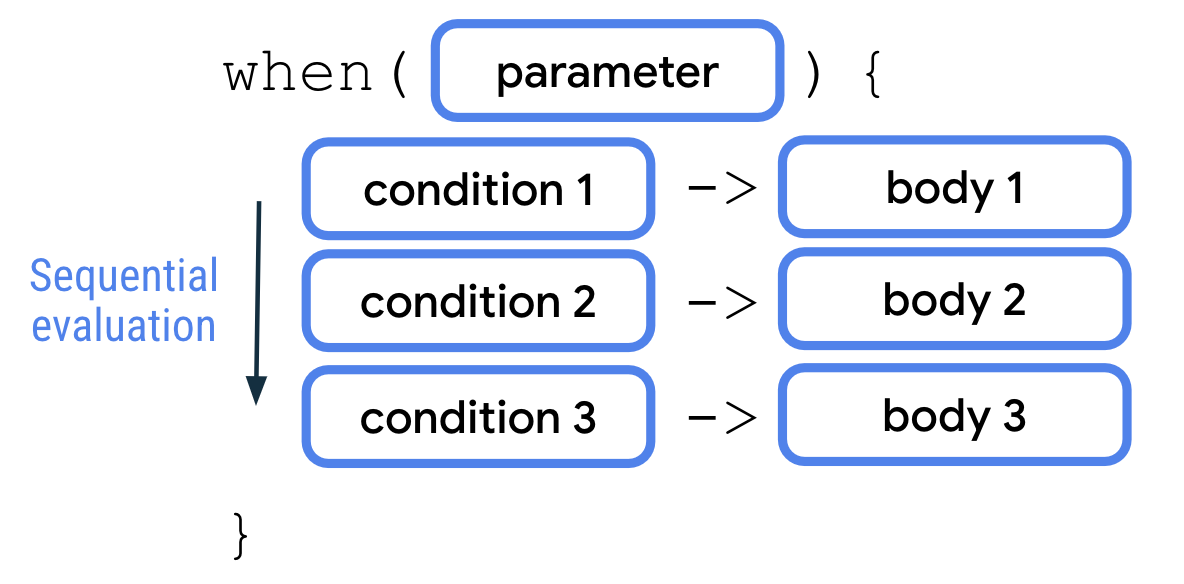
A
whenstatement accepts a single value through the parameter. The value is then evaluated against each of the conditions sequentially. The corresponding body of the first condition that’s met is then executed. Each condition and body are separated by an arrow (->). Similar toif/elsestatements, each pair of condition and body is called a branch inwhenstatements. Also similar to theif/elsestatement, you can add anelsebranch as your final condition in awhenstatement that works as a catchall branch.Examples:
fun main() {
    val trafficLightColor = "Black"

    when (trafficLightColor) {
        "Red" -> println("Stop")
        "Yellow" -> println("Slow")
        "Green" -> println("Go")
        else -> println("Invalid traffic-light color")
    }
}
fun main() {
    val x = 3

    when (x) {
        2 -> println("x is a prime number between 1 and 10.")
        3 -> println("x is a prime number between 1 and 10.")
        5 -> println("x is a prime number between 1 and 10.")
        7 -> println("x is a prime number between 1 and 10.")
        else -> println("x isn't a prime number between 1 and 10.")
    }
}
Use a comma (
,) to denote multiple conditions that correspond to the same body.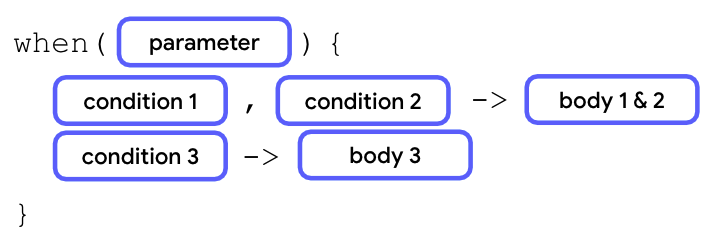
Example:
fun main() {
    val x = 3

    when (x) {
        2, 3, 5, 7 -> println("x is a prime number between 1 and 10.")
        else -> println("x isn't a prime number between 1 and 10.")
    }
}
Use the
inkeyword and a range of values inwhenbranches.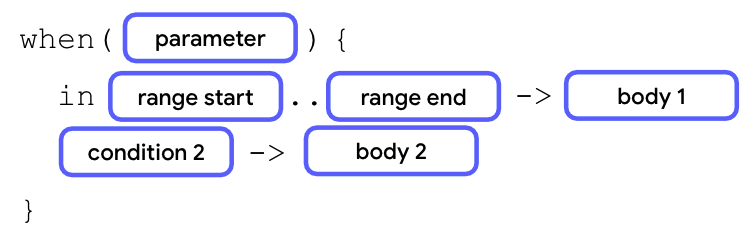
fun main() {
    val x = 3

    when (x) {
        2, 3, 5, 7 -> println("x is a prime number between 1 and 10.")
        in 1..10 -> println("x is a number between 1 and 10, but not a prime number.")
        else -> println("x isn't a prime number between 1 and 10.")
    }
}
Use the
iskeyword as a condition to check the data type of an evaluated value.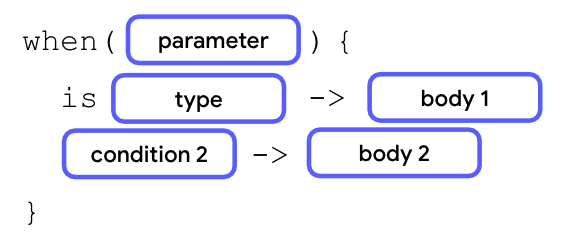
fun main() {
    val x: Any = 20

    when (x) {
        2, 3, 5, 7 -> println("x is a prime number between 1 and 10.")
        in 1..10 -> println("x is a number between 1 and 10, but not a prime number.")
        is Int -> println("x is an integer number, but not between 1 and 10.")
        else -> println("x isn't an integer number.")
    }
}
Use if/else and when as expressions
You can also use conditionals as expressions to return different values for each branch of condition. When the body of each branch appears similar, you can use conditional expressions to improve code readability compared to conditional statements.
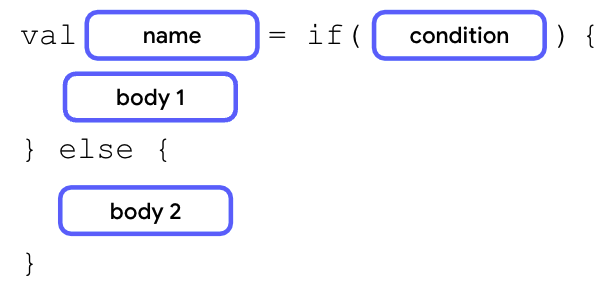
If the bodies only contain a return value or expression, you can remove the curly braces to make the code more concise.
fun main() {
    val trafficLightColor = "Black"

    val message =
        if (trafficLightColor == "Red") "Stop"
        else if (trafficLightColor == "Yellow") "Slow"
        else if (trafficLightColor == "Green") "Go"
        else "Invalid traffic-light color"

    println(message)
}
fun main() {
    val trafficLightColor = "Amber"

    val message = when(trafficLightColor) {
        "Red" -> "Stop"
        "Yellow", "Amber" -> "Slow"
        "Green" -> "Go"
        else -> "Invalid traffic-light color"
    }
    println(message)
}
Note
A
whenstatement doesn’t need theelsebranch to be defined. However, in most cases, awhenexpression requires theelsebranch because thewhenexpression needs to return a value. As such, the Kotlin compiler checks whether all the branches are exhaustive. Anelsebranch ensures that there won’t be a scenario in which the variable doesn’t get assigned a value.
Conclusion
In Kotlin, branching can be achieved with
if/elseorwhenconditionals.It’s recommended to use the
whenconditional to replace anif/elseconditional when there are more than two branches.You can write more complex conditions in
whenconditionals with the comma (,), in ranges, and theiskeyword.if/elseandwhenconditionals can work as either statements or expressions.