Unit 5 Pathway 2 Activity 2: Add repository and Manual Dependency Injection
Before you begin
Introduction
In the previous codelab, you learned how to get data from a web service by having the
ViewModelretrieve the URLs of Mars photos from the network using an API service. While this approach works and is simple to implement, it does not scale well as your app grows and needs to work with more than one data source. To address this issue, Android architecture best practices recommend separating out your UI layer and data layer.In this codelab, you will refactor the Mars Photos app into separate UI and data layers. You will learn how to implement the repository pattern and use dependency injection. Dependency injection creates a more flexible coding structure that helps with development and testing.
Prerequisites
Able to retrieve JSON from a REST web service and parse that data into Kotlin objects using the Retrofit and Serialization (kotlinx.serialization) libraries.
Knowledge of how to use a REST web service.
Able to implement coroutines in your app.
What you’ll learn
Repository pattern
Dependency injection
What you’ll build
Modify the Mars Photos app to separate the app into a UI layer and a data layer.
While separating out the data layer, you will implement the repository pattern.
Use dependency injection to create a loosely coupled codebase.
What you need
A computer with a modern web browser, such as the latest version of Chrome
Get the starter code
Branch: repo-starter
Clone:
$ git clone https://github.com/google-developer-training/basic-android-kotlin-compose-training-mars-photos.git
$ cd basic-android-kotlin-compose-training-mars-photos
$ git checkout repo-starter
Separate the UI layer and Data layer
Why different layers?
Separating the code into different layers makes your app more scalable, more robust, and easier to test. Having multiple layers with clearly defined boundaries also makes it easier for multiple developers to work on the same app without negatively impacting each other.
Android’s Recommended app architecture states that an app should have at least a UI layer and a data layer.
In this codelab, you concentrate on the data layer and make changes so your app follows the recommended best practices.
What is a data layer?
A data layer is responsible for the business logic of your app and for sourcing and saving data for your app. The data layer exposes data to the UI layer using the Unidirectional Data Flow pattern. Data can come from multiple sources, like a network request, a local database, or from a file on the device.
An app may even have more than one source of data. When the app opens, it retrieves data from a local database on the device, which is the first source. While the app is running, it makes a network request to the second source to retrieve newer data.
By having the data in a separate layer from the UI code, you can make changes in one part of the code without affecting another. This approach is part of a design principle called separation of concerns. A section of code focuses on its own concern and encapsulates its inner workings from other code. Encapsulation is a form of hiding how the code internally works from other sections of code. When one section of code needs to interact with another section of code, it does it through an interface.
The UI layer’s concern is displaying the data it is provided. The UI no longer retrieves the data as that is the data layer’s concern.
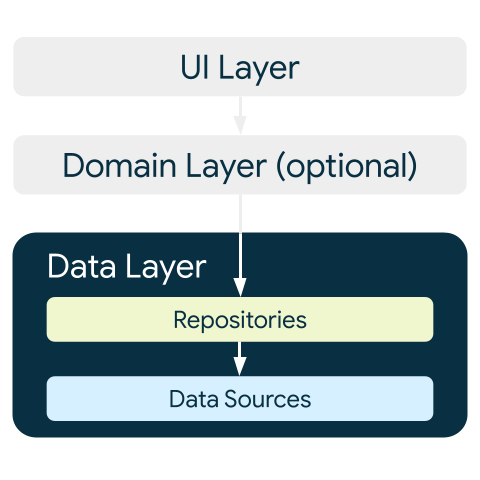
The data layer is made up of one or more repositories. Repositories themselves contain zero or more data sources.
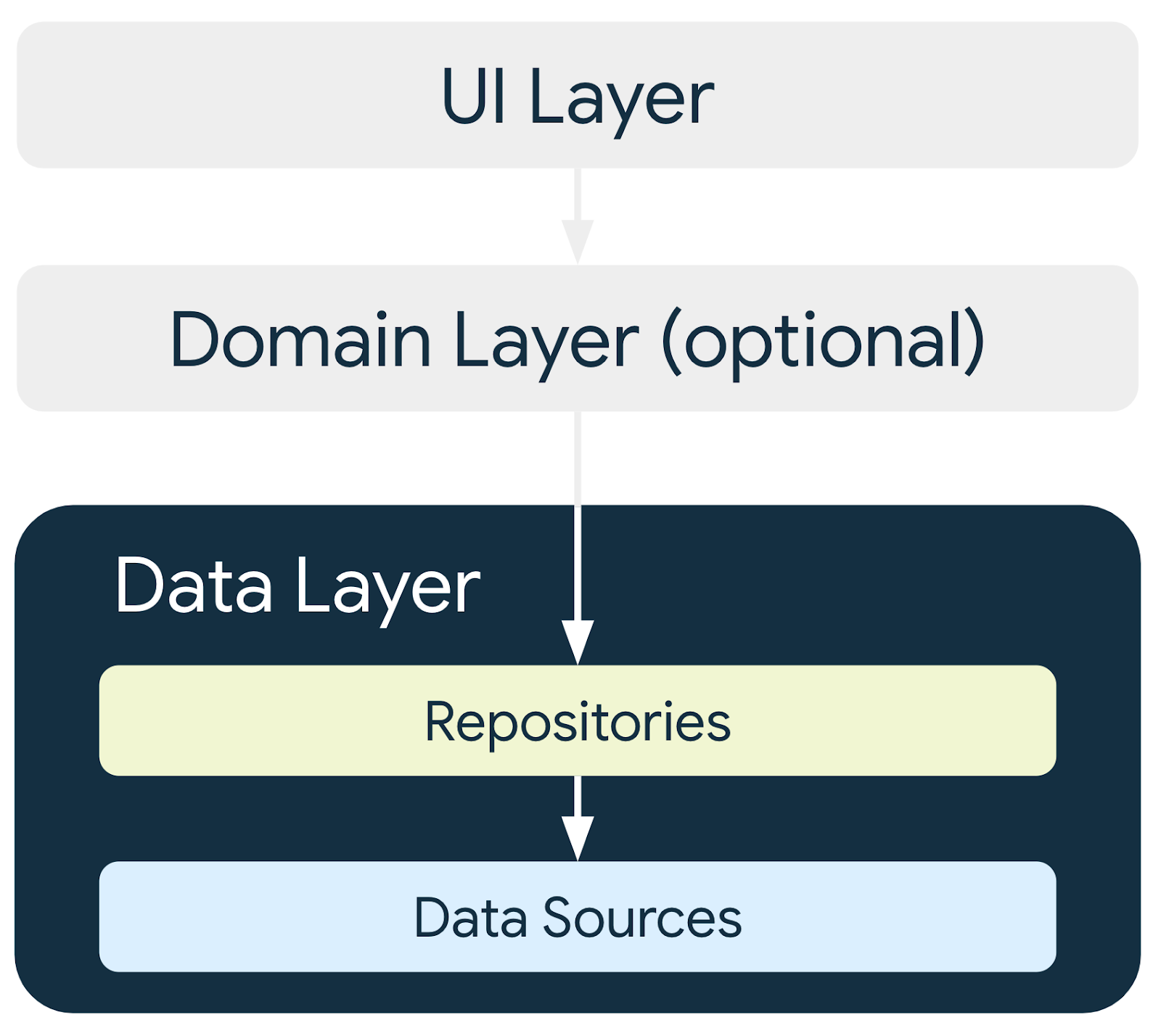
Best practices require the app to have a repository for each type of data source your app uses.
In this codelab, the app has one data source, so it has one repository after you refactor the code. For this app, the repository that retrieves data from the internet completes the data source’s responsibilities. It does so by making a network request to an API. If the data source coding is more complex or additional data sources are added, the data source responsibilities are encapsulated in separate data source classes, and the repository is responsible for managing all the data sources.
What is a repository?
In general a repository class:
Exposes data to the rest of the app.
Centralizes changes to data.
Resolves conflicts between multiple data sources.
Abstracts sources of data from the rest of the app.
Contains business logic.
The Mars Photos app has a single data source, which is the network API call. It does not have any business logic, as it is just retrieving data. The data is exposed to the app through the repository class, which abstracts away the source of the data.
Create Data layer
First, you need to create the repository class. The Android developers guide states that repository classes are named after the data they’re responsible for. The repository naming convention is type of data + Repository. In your app, this is
MarsPhotosRepository.
Create repository
Right-click on
com.example.marsphotos➜ New ➜ Package ➜ enterdata.Right-click on the
datapackage ➜ New ➜ Kotlin Class/File ➜ select Interface ➜ enterMarsPhotosRepositoryAdd this code:
import com.example.marsphotos.model.MarsPhoto
import com.example.marsphotos.network.MarsApi

interface MarsPhotosRepository {
    suspend fun getMarsPhotos(): List<MarsPhoto>
}

class NetworkMarsPhotosRepository() : MarsPhotosRepository {
    override suspend fun getMarsPhotos(): List<MarsPhoto> {
        return MarsApi.retrofitService.getPhotos()
    }
}
Next, you need to update the
ViewModelcode to use the repository to get the data as Android best practices suggest.In
ui/screens/MarsViewModel.kt➜getMarsPhotos(), replace the lineval listResult = MarsApi.retrofitService.getPhotos()with the following code:val marsPhotosRepository = NetworkMarsPhotosRepository() val listResult = marsPhotosRepository.getMarsPhotos()
imports
import com.example.marsphotos.data.NetworkMarsPhotosRepository
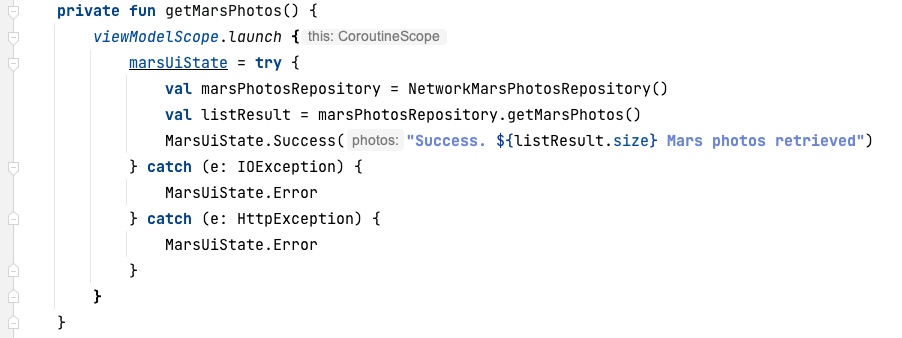
Run the app. Notice that the results displayed are the same as the previous results.
Instead of the
ViewModeldirectly making the network request for the data, the repository provides the data. TheViewModelno longer directly references theMarsApicode.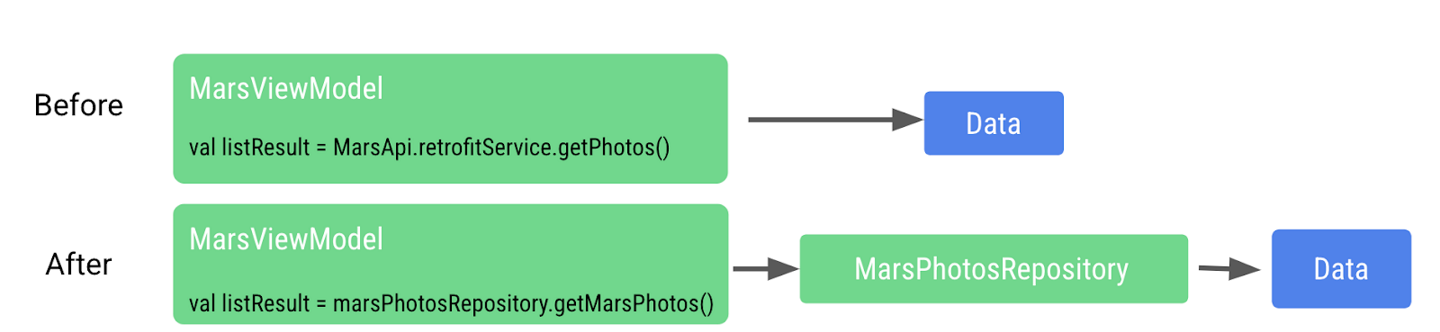
This approach helps make the code retrieving the data loosely coupled from
ViewModel. Being loosely coupled allows changes to be made to theViewModelor the repository without adversely affecting the other, as long as the repository has a function calledgetMarsPhotos().We are now able to make changes to the implementation inside the repository without affecting the caller. For larger apps, this change can support multiple callers.
Dependency injection
Many times, classes require objects of other classes to function. When a class requires another class, the required class is called a dependency.
In the following examples, the
Carobject depends on anEngineobject.There are two ways for a class to get these required objects. One way is for the class to instantiate the required object itself.
interface Engine {
    fun start()
}

class GasEngine : Engine {
    override fun start() {
        println("GasEngine started!")
    }
}

class Car {

    private val engine = GasEngine()

    fun start() {
        engine.start()
    }
}

fun main() {
    val car = Car()
    car.start()
}
The other way is by passing the required object in as an argument.
interface Engine {
    fun start()
}

class GasEngine : Engine {
    override fun start() {
        println("GasEngine started!")
    }
}

class Car(private val engine: Engine) {
    fun start() {
        engine.start()
    }
}

fun main() {
    val engine = GasEngine()
    val car = Car(engine)
    car.start()
}
Having a class instantiate the required objects is easy, but this approach makes the code inflexible and more difficult to test as the class and the required object are tightly coupled.
The calling class needs to call the object’s constructor, which is an implementation detail. If the constructor changes, the calling code needs to change, too.
To make the code more flexible and adaptable, a class must not instantiate the objects it depends on. The objects it depends on must be instantiated outside the class and then passed in. This approach creates more flexible code, as the class is no longer hardcoded to one particular object. The implementation of the required object can change without needing to modify the calling code.
Continuing with the preceding example, if an
ElectricEngineis needed, it can be created and passed into theCarclass. TheCarclass does not need to be modified in any way.interface Engine { fun start() } class ElectricEngine : Engine { override fun start() { println("ElectricEngine started!") } } class Car(private val engine: Engine) { fun start() { engine.start() } } fun main() { val engine = ElectricEngine() val car = Car(engine) car.start() }
Passing in the required objects is called dependency injection (DI). It is also known as inversion of control.
DI is when a dependency is provided at runtime instead of being hardcoded into the calling class.
Implementing dependency injection:
Helps with the reusability of code. Code is not dependent on a specific object, which allows for greater flexibility.
Makes refactoring easier. Code is loosely coupled, so refactoring one section of code does not impact another section of code.
Helps with testing. Test objects can be passed in during testing.
One example of how DI can help with testing is when testing the network calling code. For this test, you are really trying to test that the network call is made and that data is returned. If you had to pay for mobile data each time you made a network request during a test, you might decide to skip testing this code, as it can get expensive. Now, imagine if we can fake the network request for testing. How much happier (and wealthier) does that make you? For testing, you can pass a test object to the repository that returns fake data when called without actually performing a real network call.
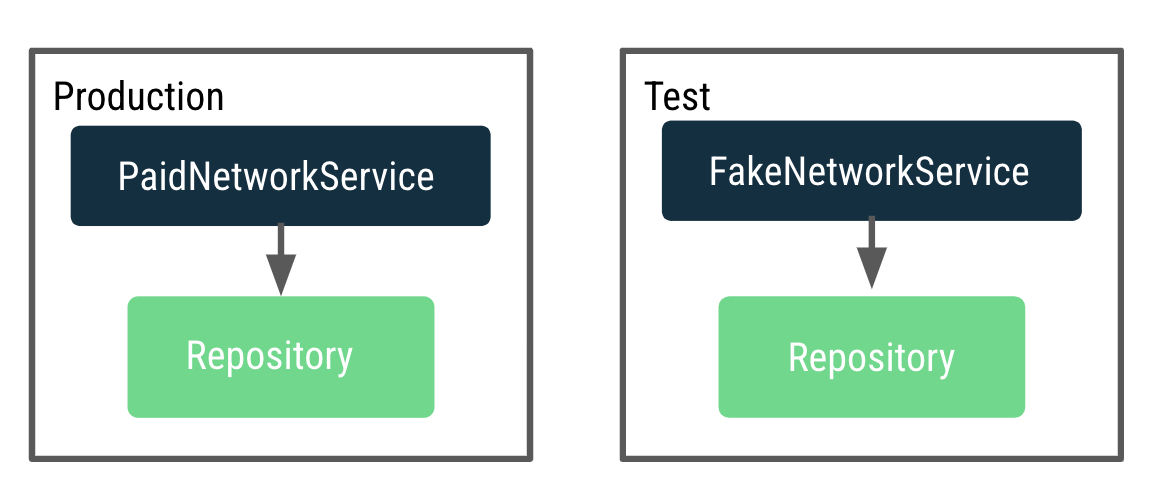
We want to make the
ViewModeltestable, but it currently depends on a repository that makes actual network calls. When testing with the real production repository, it makes many network calls. To fix this issue, instead of theViewModelcreating the repository, we need a way to decide and pass a repository instance to use for production and test dynamically.This process is done by implementing an application container that provides the repository to
MarsViewModel.A container is an object that contains the dependencies that the app requires. These dependencies are used across the whole application, so they need to be in a common place that all activities can use. You can create a subclass of the Application class and store a reference to the container.
Create an Application Container
Right-click on the
datapackage and select New > Kotlin Class/File.In the dialog, select Interface, and enter
AppContaineras the name of the interface.Inside the
AppContainerinterface, add an abstract property calledmarsPhotosRepositoryof typeMarsPhotosRepository.
Below the interface definition, create a class called
DefaultAppContainerthat implements the interfaceAppContainer.From
network/MarsApiService.kt, move the code for variablesBASE_URL,retrofit, andretrofitServiceinto theDefaultAppContainerclass so that they are all located within the container that maintains the dependencies.import retrofit2.Retrofit import com.example.marsphotos.network.MarsApiService import com.jakewharton.retrofit2.converter.kotlinx.serialization.asConverterFactory import kotlinx.serialization.json.Json import okhttp3.MediaType.Companion.toMediaType class DefaultAppContainer : AppContainer { private const val BASE_URL = "https://android-kotlin-fun-mars-server.appspot.com" private val retrofit: Retrofit = Retrofit.Builder() .addConverterFactory(Json.asConverterFactory("application/json".toMediaType())) .baseUrl(BASE_URL) .build() private val retrofitService: MarsApiService by lazy { retrofit.create(MarsApiService::class.java) } }
For variable
BASE_URL, remove theconstkeyword. Removingconstis necessary becauseBASE_URLis no longer a top level variable and is now a property of theDefaultAppContainerclass. Refactor it to camelcasebaseUrl.For variable
retrofitService, add aprivatevisibility modifier. Theprivatemodifier is added because variableretrofitServiceis only used inside the class by propertymarsPhotosRepository, so it does not need to be accessible outside the class.The
DefaultAppContainerclass implements the interfaceAppContainer, so we need to override themarsPhotosRepositoryproperty. After the variableretrofitService, add the following code:override val marsPhotosRepository: MarsPhotosRepository by lazy { NetworkMarsPhotosRepository(retrofitService) }
The completed DefaultAppContainer class should look like this:
class DefaultAppContainer : AppContainer {

    private val baseUrl =
        "https://android-kotlin-fun-mars-server.appspot.com"

    /**
    * Use the Retrofit builder to build a retrofit object using a kotlinx.serialization converter
    */
    private val retrofit = Retrofit.Builder()
        .addConverterFactory(Json.asConverterFactory("application/json".toMediaType()))
        .baseUrl(baseUrl)
        .build()

    private val retrofitService: MarsApiService by lazy {
        retrofit.create(MarsApiService::class.java)
    }

    override val marsPhotosRepository: MarsPhotosRepository by lazy {
        NetworkMarsPhotosRepository(retrofitService)
    }
}
Open the
data/MarsPhotosRepository.ktfile. We are now passingretrofitServicetoNetworkMarsPhotosRepository, and you need to modify theNetworkMarsPhotosRepositoryclass.In the
NetworkMarsPhotosRepositoryclass declaration, add the constructor parametermarsApiServiceas shown in the following code.import com.example.marsphotos.network.MarsApiService class NetworkMarsPhotosRepository( private val marsApiService: MarsApiService ) : MarsPhotosRepository {
In the
NetworkMarsPhotosRepositoryclass, change thegetMarsPhotos()function:override suspend fun getMarsPhotos(): List<MarsPhoto> = marsApiService.getPhotos()
Remove the following import from the
MarsPhotosRepository.ktfile.// Remove import com.example.marsphotos.network.MarsApi
From the
network/MarsApiService.ktfile, we moved all the code out of the object. We can now delete the remaining object declaration as it is no longer needed. Delete the following code:object MarsApi { }
Attach application container to the app
The steps in this section connect the application object to the application container as shown in the following figure.
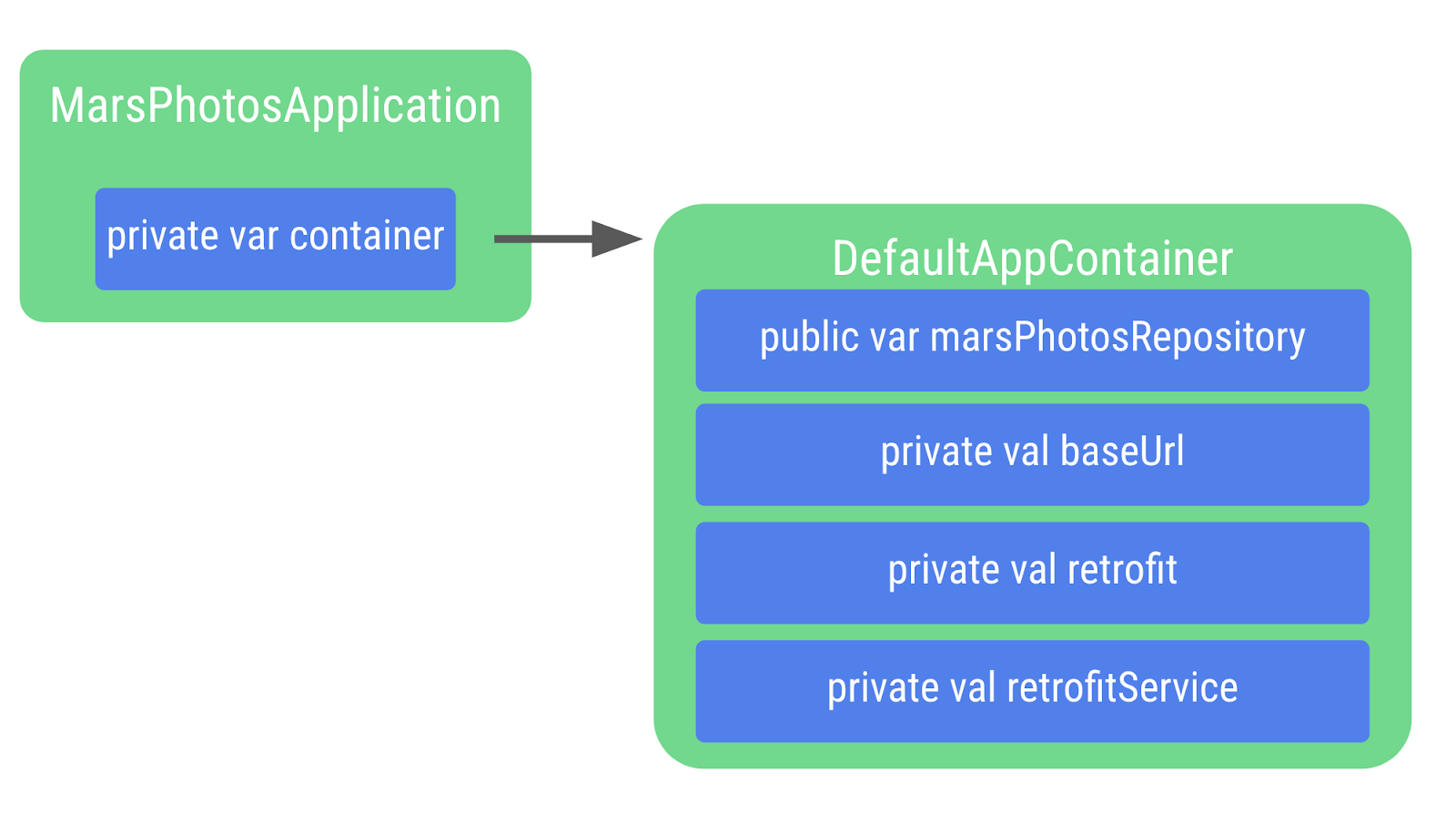
Right-click on com.example.marsphotos and select New > Kotlin Class/File.
In the dialog, enter
MarsPhotosApplication. This class inherits from the application object, so you need to add it to the class declaration.import android.app.Application class MarsPhotosApplication : Application() { }
Inside the
MarsPhotosApplicationclass, declare a variable calledcontainerof the typeAppContainerto store theDefaultAppContainerobject. The variable is initialized during the call toonCreate(), so the variable needs to be marked with thelateinitmodifier.import com.example.marsphotos.data.AppContainer import com.example.marsphotos.data.DefaultAppContainer lateinit var container: AppContainer override fun onCreate() { super.onCreate() container = DefaultAppContainer() }
The complete
MarsPhotosApplication.ktfile should look like the following code:package com.example.marsphotos import android.app.Application import com.example.marsphotos.data.AppContainer import com.example.marsphotos.data.DefaultAppContainer class MarsPhotosApplication : Application() { lateinit var container: AppContainer override fun onCreate() { super.onCreate() container = DefaultAppContainer() } }
You need to update the Android manifest so the app uses the application class you just defined. Open the
manifests/AndroidManifest.xmlfile.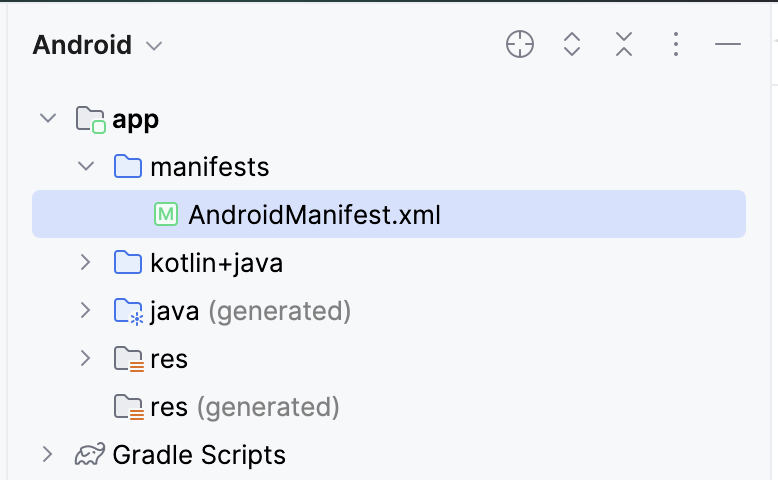
In the
applicationsection, add theandroid:nameattribute with a value of application class name".MarsPhotosApplication".<application android:name=".MarsPhotosApplication" android:allowBackup="true" ... </application>
Add repository to ViewModel
Once you complete these steps, the
ViewModelcan call the repository object to retrieve Mars data.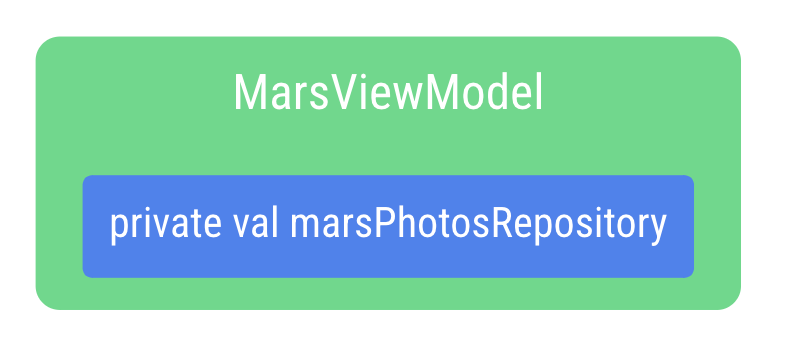
Open the
ui/screens/MarsViewModel.ktfile.In the class declaration for
MarsViewModel, add a private constructor parametermarsPhotosRepositoryof type MarsPhotosRepository. The value for the constructor parameter comes from the application container because the app is now using dependency injection.import com.example.marsphotos.data.MarsPhotosRepository class MarsViewModel(private val marsPhotosRepository: MarsPhotosRepository) : ViewModel(){
In the
getMarsPhotos()function, remove the following line of code asmarsPhotosRepositoryis now being populated in the constructor call.val marsPhotosRepository = NetworkMarsPhotosRepository()
Because the Android framework does not allow a
ViewModelto be passed values in the constructor when created, we implement aViewModelProvider.Factoryobject, which lets us get around this limitation.The Factory pattern is a creational pattern used to create objects. The
MarsViewModel.Factoryobject uses the application container to retrieve themarsPhotosRepository, and then passes this repository to theViewModelwhen theViewModelobject is created.Below the function
getMarsPhotos(), type the code for the companion object.A companion object helps us by having a single instance of an object that is used by everyone without needing to create a new instance of an expensive object. This is an implementation detail, and separating it lets us make changes without impacting other parts of the app’s code.
The
APPLICATION_KEYis part of theViewModelProvider.AndroidViewModelFactory.Companionobject and is used to find the app’sMarsPhotosApplicationobject, which has thecontainerproperty used to retrieve the repository used for dependency injection.import androidx.lifecycle.ViewModelProvider import androidx.lifecycle.ViewModelProvider.AndroidViewModelFactory.Companion.APPLICATION_KEY import androidx.lifecycle.viewModelScope import androidx.lifecycle.viewmodel.initializer import androidx.lifecycle.viewmodel.viewModelFactory import com.example.marsphotos.MarsPhotosApplication companion object { val Factory: ViewModelProvider.Factory = viewModelFactory { initializer { val application = (this[APPLICATION_KEY] as MarsPhotosApplication) val marsPhotosRepository = application.container.marsPhotosRepository MarsViewModel(marsPhotosRepository = marsPhotosRepository) } } }
Open the
theme/MarsPhotosApp.ktfile, inside theMarsPhotosApp()function, update theviewModel()to use the factory.Surface( // ... ) { val marsViewModel: MarsViewModel = viewModel(factory = MarsViewModel.Factory) // ... }
This
marsViewModelvariable is populated by the call to theviewModel()function that is passed theMarsViewModel.Factoryfrom the companion object as an argument to create theViewModel.Run the app to confirm it is still behaving as it was previously.
Congratulations on refactoring the Mars Photos app to use a repository and dependency injection! By implementing a data layer with a repository, the UI and data source code have been separated to follow Android best practices.
Solution code
Branch: coil-starter
Clone:
$ git clone https://github.com/google-developer-training/basic-android-kotlin-compose-training-mars-photos.git
$ cd basic-android-kotlin-compose-training-mars-photos
$ git checkout coil-starter
Conclusion
Congratulations on completing this codelab and refactoring the Mars Photos app to implement the repository pattern and dependency injection!
The app’s code is now following Android best practices for the data layer, which means it is more flexible, robust, and easily scalable.