Use function types and lambda expressions in Kotlin
Introduction
This codelab teaches you about function types, how to use function types, and syntax specific to lambda expressions.
In Kotlin, functions are considered first-class constructs. This means that functions can be treated as a data type. You can store functions in variables, pass them to other functions as arguments, and return them from other functions.
Like other data types that you can express with literal values — such as an
Inttype of a10value and aStringtype of a"Hello"value — you can also declare function literals, which are called lambda expressions or lambdas for short. You use lambda expressions extensively in Android development and more generally in Kotlin programming.
Prerequisites
Familiarity with Kotlin programming, including functions, if/else statements, and nullability
What you’ll learn
How to define a function with lambda syntax.
How to store functions in variables.
How to pass functions as arguments to other functions.
How to return functions from other functions.
How to use nullable function types.
How to make lambda expressions more concise.
What a higher-order function is.
How to use the
repeat()function.
What you’ll need
A web browser with access to Kotlin Playground
Eye Power
Store a function in a variable
So far, you learned how to declare functions with the
funkeyword. A function declared with thefunkeyword can be called, which causes the code in the function body to execute.As a first-class construct, functions are also data types, so you can store functions in variables, pass them to functions, and return them from functions. Perhaps you want the ability to change the behavior of a piece of your app at runtime or nest composable functions to build layouts like you did in previous codelabs. All this is made possible by lambda expressions.
You can see this in action with some trick-or-treating, which refers to the Halloween tradition in many countries during which children dressed in costumes go from door to door and ask, “Trick or treat,” usually in exchange for candy.
To refer to a function as a value, you need to use the function reference operator (
::). The syntax is illustrated in this image: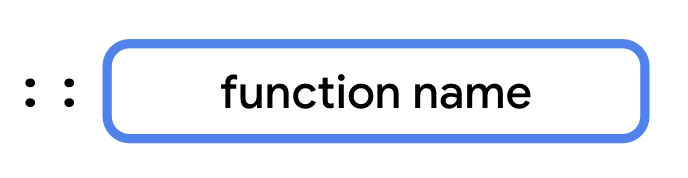
fun main() {
    val trickFunction = ::trick
}

fun trick() {
    println("No treats!")
}
Lambda expressions provide a concise syntax to define a function without the
funkeyword. You can store a lambda expression directly in a variable without a function reference on another function.Before the assignment operator (
=), you add thevalorvarkeyword followed by the name of the variable, which is what you use when you call the function. After the assignment operator (=) is the lambda expression, which consists of a pair of curly braces that form the function body. The syntax is illustrated in this image: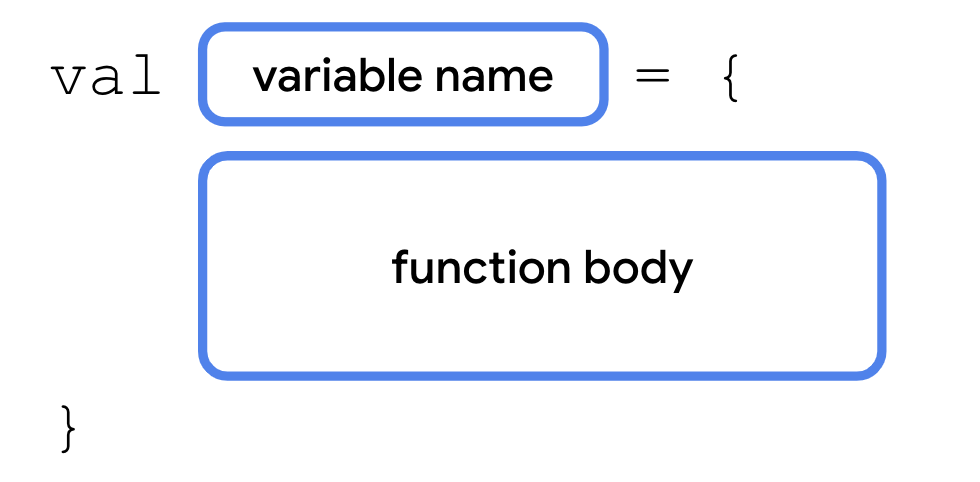
When you define a function with a lambda expression, you have a variable that refers to the function. You can also assign its value to other variables like any other type and call the function with the new variable’s name.
Example:
fun main() {
    val trickFunction = trick
    trick()
    trickFunction()
}

val trick = {
    println("No treats!")
}
Use functions as a data type
You learned in a previous codelab that Kotlin has type inference. When you declare a variable, you often don’t need to explicitly specify the type. In the previous example, the Kotlin compiler was able to infer that the value of
trickwas a function. However, if you want to specify the type of a function parameter or a return type, you need to know the syntax for expressing function types. Function types consist of a set of parentheses that contain an optional parameter list, the->symbol, and a return type. The syntax is illustrated in this image:
The data type of the
trickvariable that you declared earlier would be() -> Unit. The parentheses are empty because the function doesn’t have any parameters. The return type isUnitbecause the function doesn’t return anything. If you had a function that took twoIntparameters and returned aString, its data type would be(Int, Int) -> String.In the code below,
treat()behaves liketrick(). Both variables have the same data type even though only thetreatvariable declares it explicitly.val trick = { println("No treats!") } val treat: () -> Unit = { println("Have a treat!") } fun main() { val trickFunction = trick trick() trickFunction() treat() }
Use a function as a return type
A function is a data type, so you can use it like any other data type. You can even return functions from other functions. The syntax is illustrated in this image:
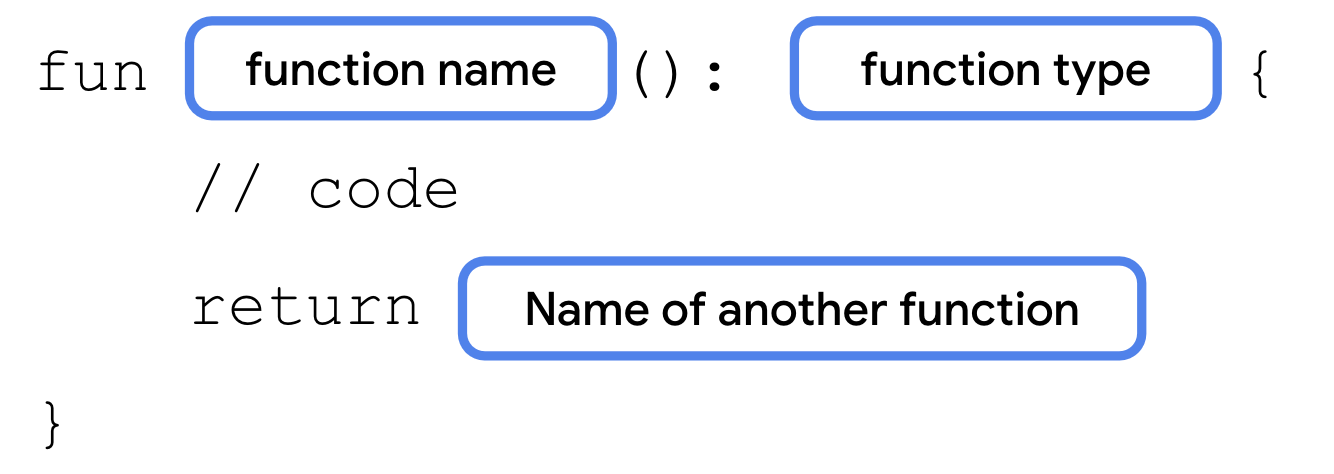
Example:
fun main() {
    val treatFunction = trickOrTreat(false)
    val trickFunction = trickOrTreat(true)
    treatFunction()
    trickFunction()
}

fun trickOrTreat(isTrick: Boolean): () -> Unit {
    if (isTrick) {
        return trick
    } else {
        return treat
    }
}

val trick = {
    println("No treats!")
}

val treat = {
    println("Have a treat!")
}
Now you know how functions can return other functions. You can also pass a function as an argument to another function. Perhaps you want to provide some custom behavior to the
trickOrTreat()function to do something other than return either of the two strings. A function that takes another function as an argument lets you pass in a different function each time that it’s called.
Pass a function to another function as an argument
In some parts of the world that celebrate Halloween, children receive spare change instead of candy or they receive both. You’ll modify your
trickOrTreat()function to allow an additional treat represented by a function to be provided as an argument.The function that
trickOrTreat()uses as a parameter also needs to take a parameter of its own. When declaring function types, the parameters aren’t labeled. You only need to specify the data types of each parameter, separated by a comma. The syntax is illustrated in this image: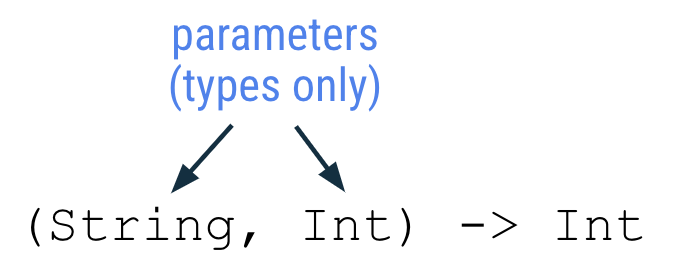
When you write a lambda expression for a function that takes a parameter, the parameters are given names in the order that they occur. Parameter names are listed after the opening curly braces and each name is separated by a comma. An
->separates the parameter names from the function body. The syntax is illustrated in this image: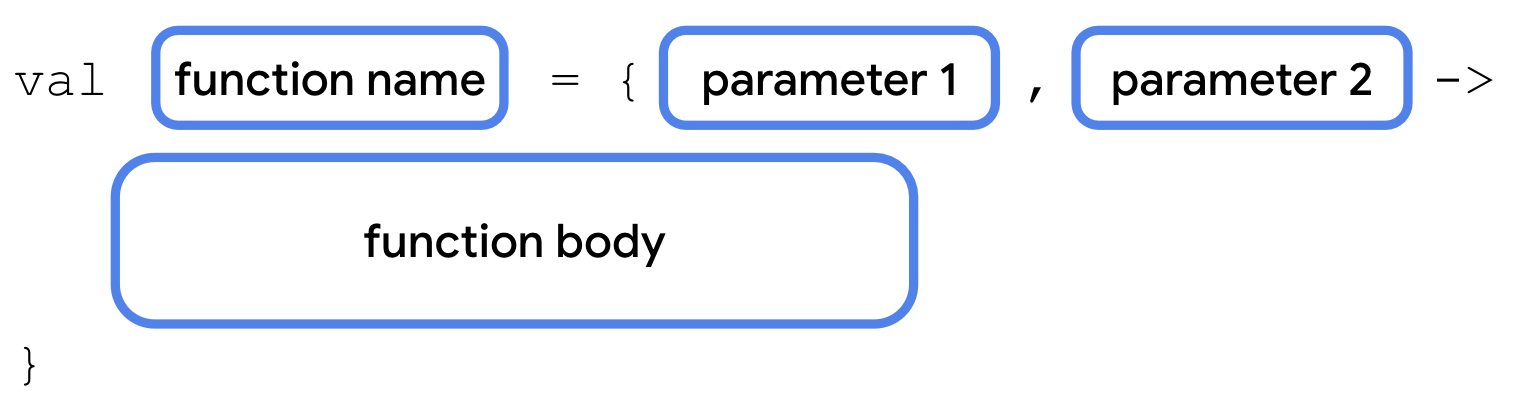
Example:
fun main() {
    val coins: (Int) -> String = { quantity ->
        "$quantity quarters"
    }

    val cupcake: (Int) -> String = {
        "Have a cupcake!"
    }

    val treatFunction = trickOrTreat(false, coins)
    val trickFunction = trickOrTreat(true, cupcake)
    treatFunction()
    trickFunction()
}

fun trickOrTreat(isTrick: Boolean, extraTreat: (Int) -> String): () -> Unit {
    if (isTrick) {
        return trick
    } else {
        println(extraTreat(5))
        return treat
    }
}

val trick = {
    println("No treats!")
}

val treat = {
    println("Have a treat!")
}
A more detailed breakdown of the code is as follows.
The code below creates a
coinsvariable. The variable can contain a function.The
(Int) -> Stringmeans this function takes anIntparameter, and returns aString.The
Intparameter is namedquantity. This could be named anything you like.The return value is a
Stringthat contains thequantityparameter and the wordquarters.
val coins: (Int) -> String = { quantity ->
    "$quantity quarters"
}
The code below creates a
cupcakevariable. The variable can contain a function.The
(Int) -> Stringmeans this function takes anIntparameter, and returns aString.The
Intparameter is not used in the function, which is fine. That’s why it’s missing thequantity -> ``, unlike the ``coins()function.It always returns the string
Have a cupcake!
val cupcake: (Int) -> String = {
    "Have a cupcake!"
}
The code below declares a function named
trickOrTreat. The function takes 2 parameters.The
isTrickparameter has aBooleantype.The
extraTreatparameter has a(Int) -> Stringtype, meaning it can hold a function thaat takes anIntparameter, and returns aString.The
trickOrTreatfunction has a return type() -> Unit, which means it returns a function that takes no parameters and returns nothing.
fun trickOrTreat(isTrick: Boolean, extraTreat: (Int) -> String): () -> Unit {
    if (isTrick) {
        return trick
    } else {
        println(extraTreat(5))
        return treat
    }
}
Nullable function types
Like other data types, function types can be declared as nullable. In these cases, a variable could contain a function or it could be
null.To declare a function as nullable, surround the function type in parentheses followed by a
?symbol outside the ending parenthesis. For example, if you want to make the() -> Stringtype nullable, declare it as a(() -> String)?type. The syntax is illustrated in this image:
Make the
extraTreatparameter nullable so that you don’t have to provide anextraTreat()function every time that you call thetrickOrTreat()function:Example:
fun trickOrTreat(isTrick: Boolean, extraTreat: ((Int) -> String)?): () -> Unit {
    if (isTrick) {
        return trick
    } else {
        if (extraTreat != null) {
            println(extraTreat(5))
        }
        return treat
    }
}

fun main() {
    val coins: (Int) -> String = { quantity ->
        "$quantity quarters"
    }

    val treatFunction = trickOrTreat(false, coins)
    val trickFunction = trickOrTreat(true, null)
    treatFunction()
    trickFunction()
}

val trick = {
    println("No treats!")
}

val treat = {
    println("Have a treat!")
}
Write lambda expressions with shorthand syntax
Lambda expressions provide a variety of ways to make your code more concise. You explore a few of them in this section because most of the lambda expressions that you encounter and write are written with shorthand syntax.
Omit parameter name
When you wrote the
coins()function, you explicitly declared the namequantityfor the function’sIntparameter. However, as you saw with thecupcake()function, you can omit the parameter name entirely. When a function has a single parameter and you don’t provide a name, Kotlin implicitly assigns it theitname, so you can omit the parameter name and->symbol, which makes your lambda expressions more concise. The syntax is illustrated in this image: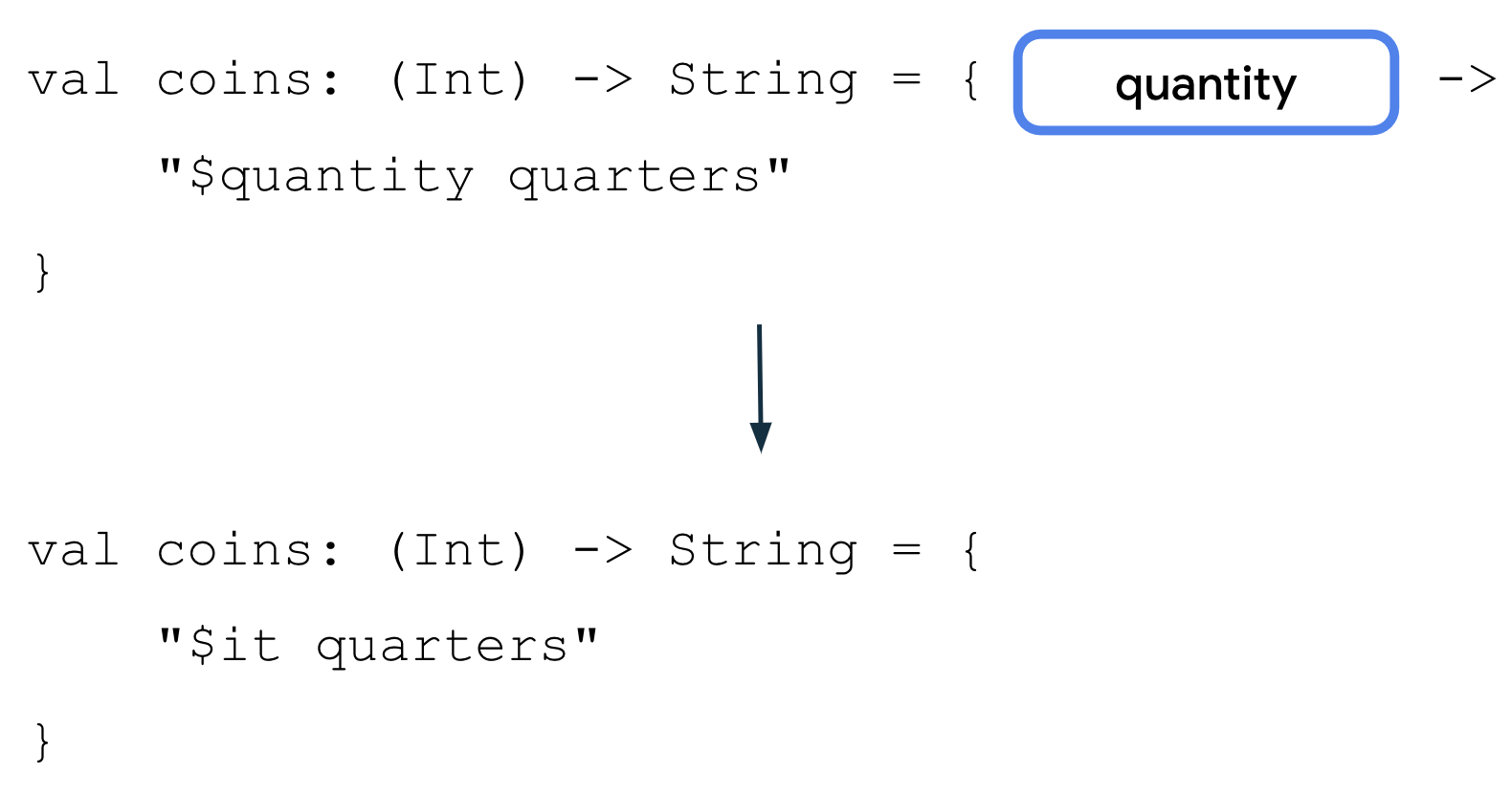
Example:
val coins: (Int) -> String = {
    "$it quarters"
}
$itcan only be used for a single parameter. If a lambda expression has multiple parameters, you must explicitly name them.
Pass a lambda expression directly into a function
The
coins()function is currently only used in one place. What if you could simply pass a lambda expression directly into thetrickOrTreat()function without the need to first create a variable?Lambda expressions are simply function literals, just like
0is an integer literal or"Hello"is a string literal. You can pass a lambda expression directly into a function call. The syntax is illustrated in this image: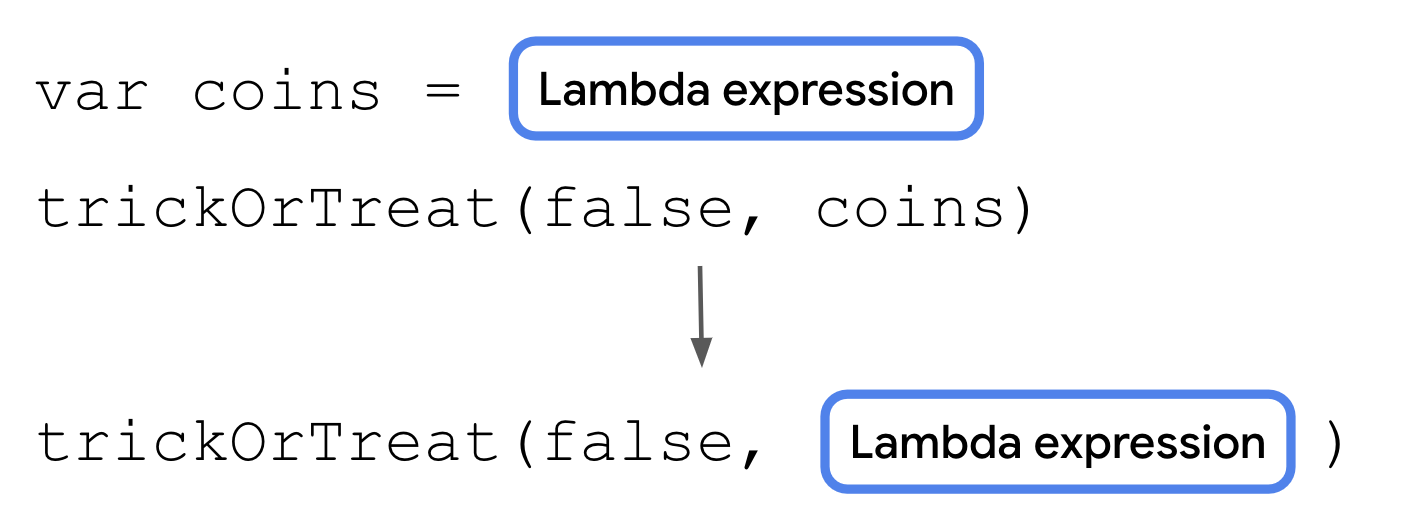
Example:
fun main() {
    val treatFunction = trickOrTreat(false, { "$it quarters" })
    val trickFunction = trickOrTreat(true, null)
    treatFunction()
    trickFunction()
}
Use trailing lambda syntax
You can use another shorthand option to write lambdas when a function type is the last parameter of a function. If so, you can place the lambda expression after the closing parenthesis to call the function. The syntax is illustrated in this image:
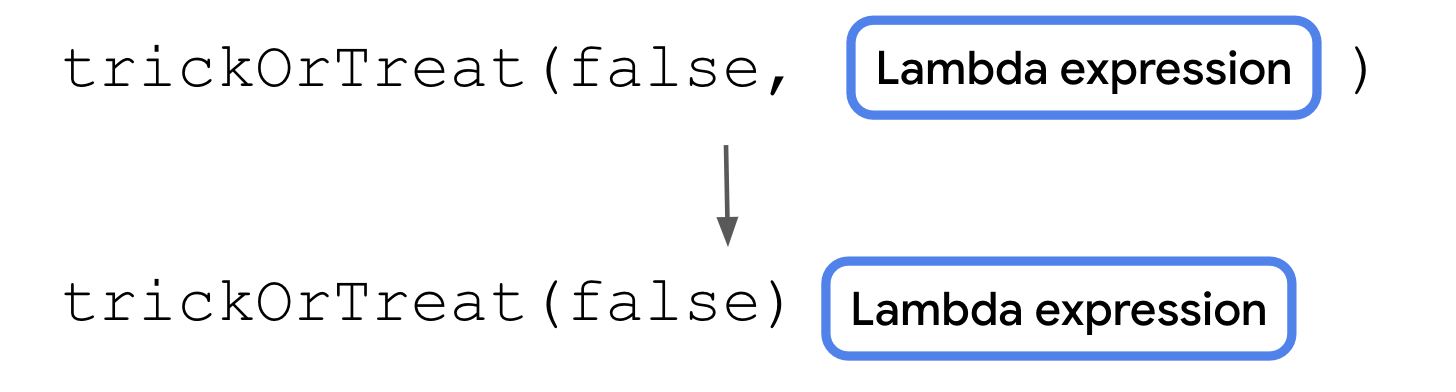
This makes your code more readable because it separates the lambda expression from the other parameters, but doesn’t change what the code does.
Example:
val treatFunction = trickOrTreat(false) { "$it quarters" }
Note
The composable functions that you used to declare your UI take functions as parameters and are typically called using trailing lambda syntax.
Use the repeat() function
When a function returns a function or takes a function as an argument, it’s called a higher-order function. The
trickOrTreat()function is an example of a higher-order function because it takes a function of type((Int) -> String)?as a parameter and returns a function of type() -> Unit. Kotlin provides several useful higher-order functions, which you can take advantage of with your newfound knowledge of lambdas.The
repeat()function is one such higher-order function. Therepeat()function is a concise way to express a for loop with functions. You use this and other higher-order functions frequently in later units. Therepeat()function has this function signature:repeat(times: Int, action: (Int) -> Unit)
The
timesparameter is the number of times that the action should happen. Theactionparameter is a function that takes a singleIntparameter and returns aUnittype. Theactionfunction’sIntparameter is the number of times that the action has executed so far, such as a0argument for the first iteration or a1argument for the second iteration. You can use therepeat()function to repeat code a specified number of times, similar to aforloop. The syntax is illustrated in this image:
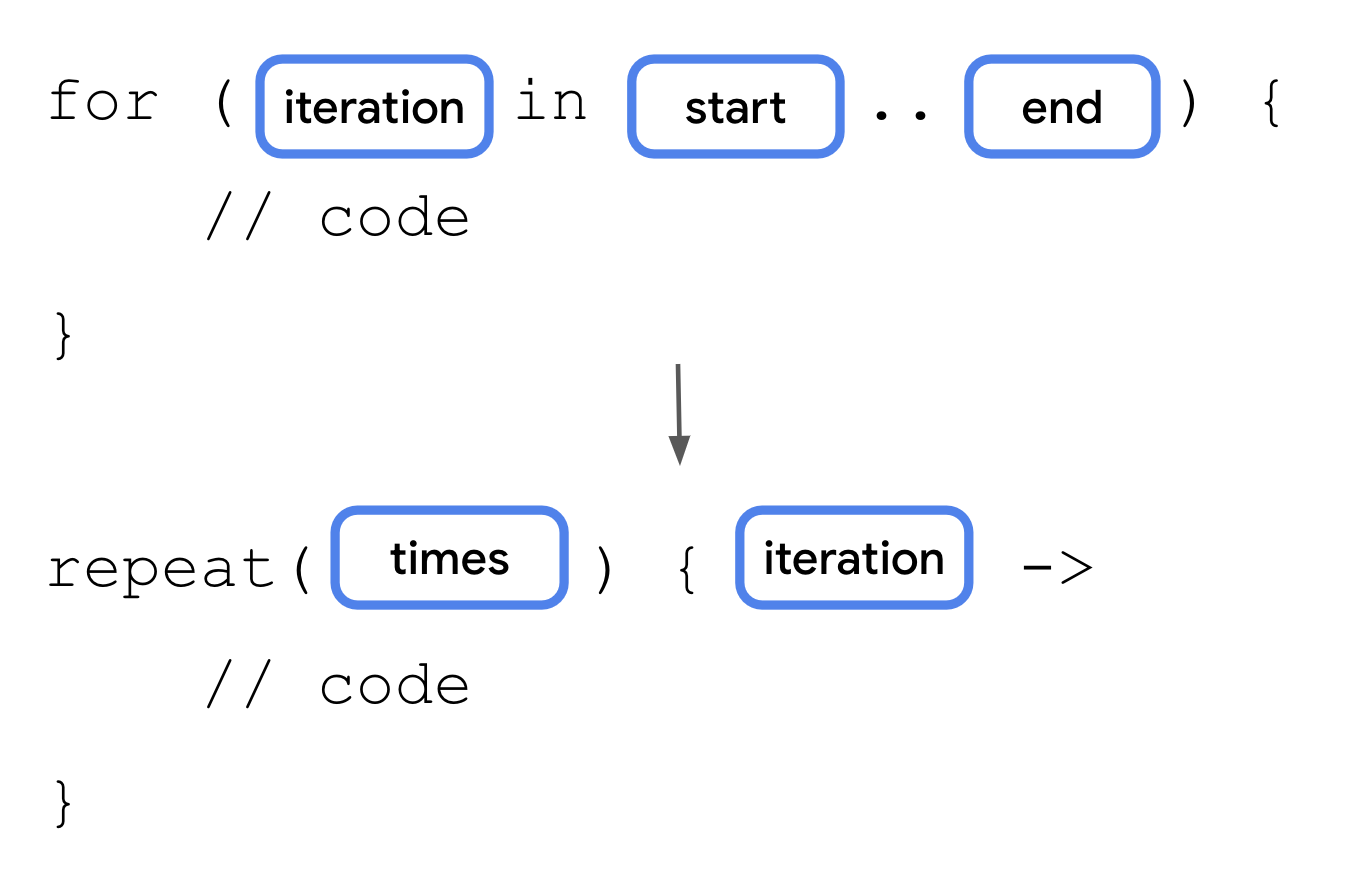
Instead of calling the
trickFunction()function only once, you can call it multiple times with therepeat()function.Example:
fun main() {
    val treatFunction = trickOrTreat(false) { "$it quarters" }
    val trickFunction = trickOrTreat(true, null)
    repeat(4) {
        treatFunction()
    }
    trickFunction()
}
Conclusion
Functions in Kotlin are first-class constructs and can be treated like data types.
Lambda expressions provide a shorthand syntax to write functions.
You can pass function types into other functions.
You can return a function type from another function.
A lambda expression returns the value of the last expression.
If a parameter label is omitted in a lambda expression with a single parameter, it’s referred to with the
itidentifier.Lambdas can be written inline without a variable name.
If a function’s last parameter is a function type, you can use trailing lambda syntax to move the lambda expression after the last parenthesis when you call a function.
Higher-order functions are functions that take other functions as parameters or return a function.
The
repeat()function is a higher-order function that works similarly to aforloop.