Unit 5 Pathway 2 Activity 5: Project: Create a Bookshelf app
Before you begin
Prerequisites
Ability to create and run a project in Android Studio.
Ability to create layouts in Jetpack Compose.
Experience using coroutines in Kotlin.
Experience working with Retrofit, Coil.
What you’ll build
An Android app that makes multiple requests to a web service and displays asynchronous downloaded images.
What you’ll need
A computer with Android Studio installed.
Overview
To practice the concepts you learned in this unit, you’re going to build an app on your own that displays a list of books with images from the Google Books API.
The app is expected to do the following:
Make a request to the Google Books API using Retrofit.
Parse the response.
Display asynchronously downloaded images of the books along with their titles in a vertical grid.
Implement best practices, separating the UI and data layer, by using a repository.
Write tests for code that requires the network service, using dependency injection.
The goal of this project is twofold. First, you get to put all the concepts you’ve learned in this unit into practice. You also get to work with a brand new REST API, read documentation, and apply the skills you’ve learned into a new app, just like you’d do as a professional Android developer.
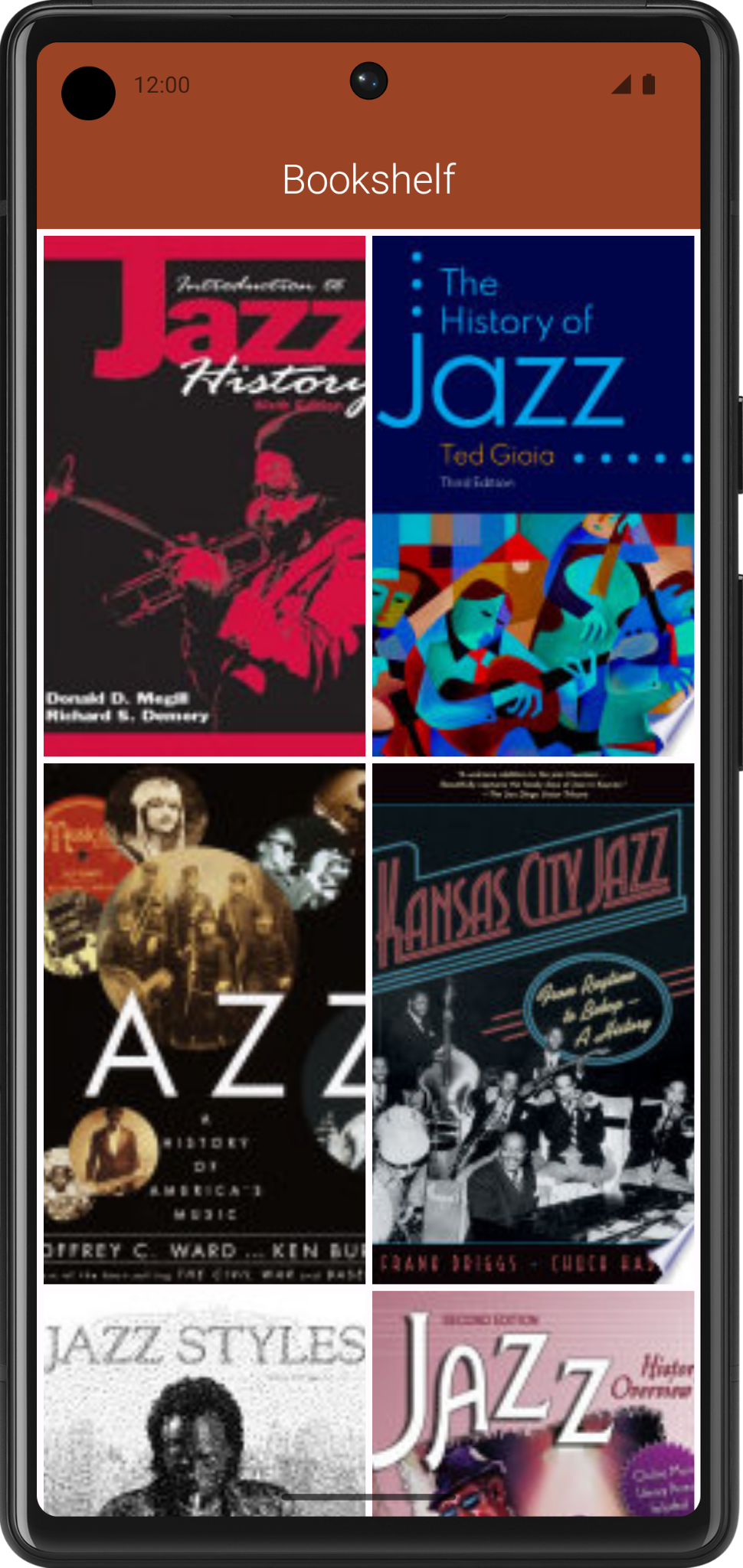
The following screenshot shows an example of the finished Bookshelf app. The exact layout and books displayed by the app is up to you. You learn more about how to retrieve the book data in the following sections.
Plan your app
Plan your UI
You can design your app’s UI however you want. You need to consider how your app’s layout adapts to different device form factors.
Because you’re using a scrolling grid of images, you need to load multiple images simultaneously onscreen. After you’ve obtained the URL of the image, you can use the
AsyncImagecomposable provided by the Coil library to download the data in the background. Where possible, be sure to indicate to users when your app is using the network.
Plan the network layer
Previously, you learned how to get data from the network and parse JSON responses. For the Bookshelf app, the data layer needs to do the following three things:
Create a Retrofit service to get data from the Google Books API.
Add methods for the service to get a list of books and get information about a specific book.
Extract meaningful data from the JSON response returned by the API.
Let’s briefly go over the methods of the Google Books API that you need for this project.
Search for books
The Google Books API provides a method that returns a list of books based on a particular search term, as described in Using the API <https://developers.google.com/books/docs/v1/using#PerformingSearch>.
For example, this URL returns search results for the term “jazz history”.
https://www.googleapis.com/books/v1/volumes?q=jazz+history
There are several query parameters to filter your search. For the Bookshelf app, the
qparameter (short for query) is sufficient.The documentation also shows the expected JSON response. For the Bookshelf app, you need to extract the book’s
id.
Request info for a specific book
You need to make a request to get info on a specific book. This endpoint takes the id you extracted from the previous response.
https://www.googleapis.com/books/v1/volumes/<volume_id>
You can find thumbnail links in the
imageLinksobject in thevolumeInfoobject. For this app, the images you want to download are under thethumbnailkey.... "imageLinks": { "smallThumbnail": "http://books.google.com/books/publisher/content?id=EPUTEAAAQBAJ&printsec=frontcover&img=1&zoom=5&edge=curl&imgtk=AFLRE734s3CngIs16gM_Ht6GeGF4ew664I7oOGghmfk4pgfFcDYb4GlYCYdjtqqXluL2KUyfq_Ni5MSyv4JxEJ8W679zQ2Ib3okUKau3I1ruqBGrWOt2_haUauWC8sXEgjN7JHm4uOjS&source=gbs_api", "thumbnail": "http://books.google.com/books/publisher/content?id=EPUTEAAAQBAJ&printsec=frontcover&img=1&zoom=1&edge=curl&imgtk=AFLRE71N0ldzv6rliUV_K5ZACa9yPNcT8Ino6YKXJUMje_z4GsC9cp6gFql5TxlmqMoYN3CDhM3XAIO2riFeMXUnFVr5pTLq91htTtG1DDyvOdiR4yI6xu3yEEAn0dRbvNFZ5m7dUC9E&source=gbs_api", "small": "http://books.google.com/books/publisher/content?id=EPUTEAAAQBAJ&printsec=frontcover&img=1&zoom=2&edge=curl&imgtk=AFLRE71HmTwpoe3KR0AISYk5sDgV2Fz-F-6CDKJtFdvlXSZv3jEzFtsSXGJnEGjtCuoDMxP_6sgP8au1yadB7OmI2MhIBquel7ivcDB8e9ieLyh4HNoXnX3zmxfF_CfIfnNXDv0WHuyA&source=gbs_api", "medium": "http://books.google.com/books/publisher/content?id=EPUTEAAAQBAJ&printsec=frontcover&img=1&zoom=3&edge=curl&imgtk=AFLRE72LMPH7Q2S49aPeQ3Gm8jLEf6zH4ijuE0nvbOyXBUAgyL816pXzaw0136Pk8jXpfYYFY0IsqL7G7MMDMgKcJhnaoHojWNZpljZmGHeWLL_M7hxkOpmdmO7xza8dfVfPbFmBH4kl&source=gbs_api", "large": "http://books.google.com/books/publisher/content?id=EPUTEAAAQBAJ&printsec=frontcover&img=1&zoom=4&edge=curl&imgtk=AFLRE71w0J9EOzUzu1O5GMbwhnpI8BLWzOEtzqc9IfyxEDqimZ--H4JlNAZh_1zx8pqPNRf1qDt7FPb57lH5ip-LBlK3zjMC-MCBYcciuoPjTJOFmLv7pp5B6_-UFBap1KRfC0eG7P4d&source=gbs_api", "extraLarge": "http://books.google.com/books/publisher/content?id=EPUTEAAAQBAJ&printsec=frontcover&img=1&zoom=6&edge=curl&imgtk=AFLRE73t0gcxT-jzEETp8Yo5Osr15nVL7ntKL2WSe2S8kRSio7w0CGgErAq4WbPWIsH4TmOdP_EO6ZoPNSP-YGSOwqfPMw8_IlYE6hy9IKeAs5V_xaHy7drZleF0eizAQiEVg5ci7qby&source=gbs_api" }, ...Note
Tip: Because you need to make two sets of requests to get the image URLs, getting the list of book images is more involved than what you did in the Mars photos app.
The following approach might help you implement this app:
Perform the first request to search for books.
Perform the requests to get individual book data one after another in the same coroutine. This way, each request is performed one after the other until the coroutine finishes. After all the requests have finished, store each thumbnail in a
MutableList.Load each of the thumbnails in the
AsyncImagecomposables.
Download book thumbnails
After you have the thumbnail URL, it can be provided to the
AsyncImagecomposable in each grid item.Warning
Warning: You need to replace
httpwithhttpsin the URLs for the images to show. You can do this using theString.replace()method.
Build the Bookshelf app
Now that you have an overview of the Google Books API, it’s time to build the Bookshelf API. Even though you’re using a different web service, you’ve already learned all the concepts needed to complete this project. You can always refer to previous codelabs and sample apps from this unit if you need a refresher. The codelabs in this unit might be useful to you as you work on your project.